
SAP provides very useful and robust functionality to capture employee time in Cross-Application Time Sheets (CATS). CATS is a mechanism to capture employee time and post to cost centers, projects, networks, or other cost objects. Some important points when considering CATS:
- Uses the SAP Human Resources authorization concept
- May be updated through the SAP GUI via transaction code CAT2, company web portal, or Fiori
- Data entry in CATS may be done by an individual employee, interface uploads, or by an administrator for multiple employees
- CATS may be used as the time transfer tool to update Human Resources with hours worked by employee
- Many overrides may be entered in CATS such as tax work area, special payments, substitutions, pay rate differences
- Data entered in CATS may be set to require a approval before further processing may occur
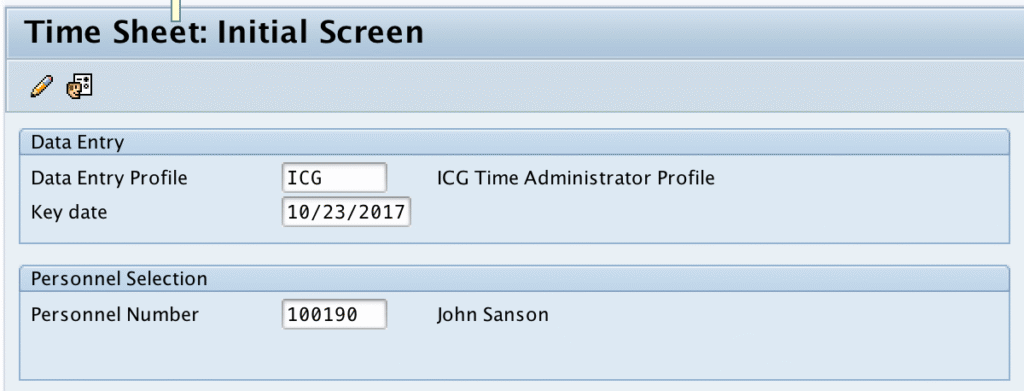
Below is a screenshot of the SAP GUI transaction code CAT2. The data entry profile entered defines how the time sheet looks. You have the ability to default in the data entry profile by setting the user parameter CVR. This specific profile allows the user to enter time for one employee at a time so we enter the personnel number we want to record. We also enter the Key date to determine the time period we will be entering the time data.
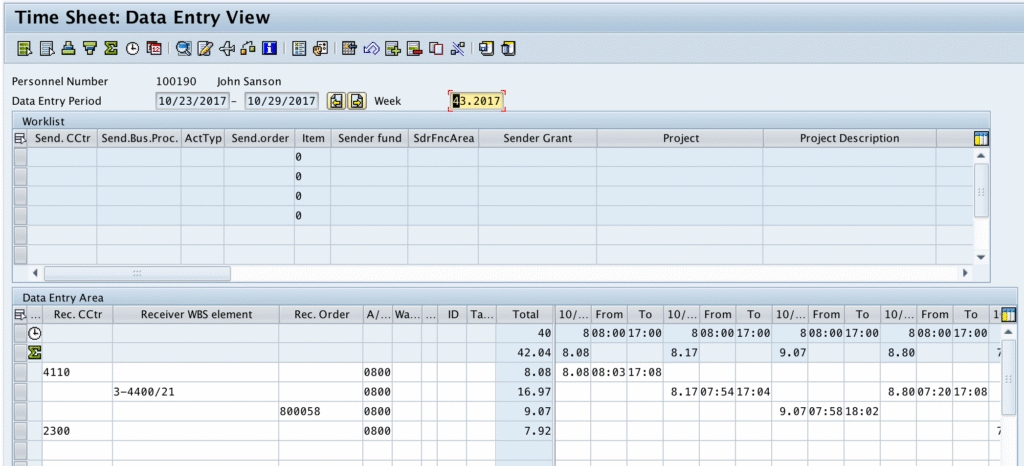
In the time entry screen, we enter the cost objects, absence or attendance type, and hours for the given day. This screen is highly customizable to meet your needs in what data is displayed and allows for entry. Beyond the entry screen, CATS user exits may be employed to perform validations and defaulting of fields.
Once the time data is captured, subsequent programs may be run to update other modules such as Human Resources, Controlling, Plant Maintenance, Project Systems. CATS can updated multiple modules or individual modules allowing flexibility.
- HR may want the data passed on a nightly basis or even immediately
- CO may want the data passed weekly
In our next blog post, we’ll discuss Using CATS Data: Updating CO (controlling).
Comments
9 responses to “Understanding the basics of CATS (cross-application time sheets)”
[…] our previous post, we discussed Understanding the basics of CATS (cross-application time sheets). SAP provides a very robust method to capture time data and have that data passed to other SAP […]
[…] our previous posts, we discussed Understanding the basics of CATS (cross-application time sheets) showing how SAP provides a very robust method to capture time data and have that data passed to […]
[…] our previous posts, we discussed Understanding the basics of CATS (cross-application time sheets) showing how SAP provides a very robust method to capture time data and have that data passed to […]
[…] our previous posts, we discussed Understanding the basics of CATS (cross-application time sheets) and the robustness that it provides to capture employee time data. We then covered three modules […]
[…] have previously covered Understanding the basics of CATS (cross-application time sheets) showing how SAP provides a very robust method to capture time data and have that data passed to […]
[…] with our blog series about CATS, we’ll next cover CATS Profiles. At the most basic level, CATS Profiles determine […]
[…] been covering CATS (cross-application time sheets) functionality over the last several blog posts. SAP has provided a way to make using some of that […]
[…] covered several aspects of CATS over the last several blog posts. As we come to an end of the series, we must talk about available user exits to enhance the CATS […]
[…] Understanding the basics of CATS Using CATS Data: Updating CO Using CATS Data: Updating PM Using CATS Data: Updating PS Using CATS Data: Updating HR Transferring CATS Data CATS Profiles CATS User Parameters CATS User Exits […]