We have reached the final post in the 10 most critical factors of SAP payroll series. Overpayments and claims are amounts that SAP Payroll determines to be owed by the employee to the company. Overpayments and claims are generated when master data is changed retroactively and the employee
received too large of an increase in Basic Pay
was on LOA and has benefits deductions due on return
received a bonus in error
Payroll will generate wage type /561 Claim which represents the amount the employee owes the company. The Payroll Reconciliation Report discussed in an earlier post provides a great way to identify employees with an outstanding claim. Then, the Claims Report (RPCLMSU0) can processed to gain a detailed understanding of what makes up the claim.
Claims will clear themselves during the next payroll run if there are sufficient funds to cover the claim. If not, the claim will remain in subsequent payrolls until paid off. However, many organization do not want to withhold the full claim amount from an employee’s check, especially, when it would result in zero net pays. This may be a hardship on the employee so the claim is cleared and a loan is set up for repayment. Another reason claims are typically cleared is due to taxing consequences when crossing tax years.
Three options exist for clearing claims:
Claims are recouped during subsequent payroll(s)
Company forgives the claim
Employee repays the claim
SAP provides model wage types for repayment and forgiveness of claims. The wage types and details of how SAP wants claims processed can be found on the SAP service market place. If you are interested in a different take on how to clear claims, Steve Bogner provides a different method that may be much simpler to understand and implement.
We’ve come a long ways in this blog post series and I hope that you have found the information good and useful.
Here at Integrated Consulting Group, we specialize in the design, development, and customization of SAP Human Capital Management business software for leading edge North American companies with global reach. Have any questions about SAP? Feel free to contact us via the contact page of our site, or on Twitter or LinkedIn.
The year-end process should not begin in October, but should start immediately after annual tax reporting is complete for the previous year. The initial tasks should be a lessons learned document and business process documentation updates. This documentation will help us to not forget what we just went through in getting the previous year done.
Nailing down an exact schedule of the year-end project can be determined by looking up the tentative release schedule of HRSPs and CLCs on the SAP customer portal. We can then incorporate overlapping projects impacts and staff vacation scheduling. We want to have a detailed project plan just like any other project because year-end requires significant amounts of resources from payroll and other areas to apply updates, configure, etc. Luckily, the year-end project plan will look similar year after year so creating the detailed project plan will occur only once and then only tweaked from year to year.
Create a periodic process to run year-end reports and review to reduce the surge at year-end. Ongoing review will make it easier at year-end, but may also identify an issue earlier in the year and configuration or processes may be adjusted with less impact. Communications to employees confirming information such as addresses, marital status, and exemptions will also reduce year-end workload.
Please join us for our next blog post where we’ll discuss Overpayments and claims as another critical factor in SAP payroll.
Here at Integrated Consulting Group, we specialize in the design, development, and customization of SAP Human Capital Management business software for leading edge North American companies with global reach. Have any questions about SAP? Feel free to contact us via the contact page of our site, or on Twitter or LinkedIn.
In this post we will cover troubleshooting as part of the series 10 most critical factors of SAP payroll. As we have discussed in previous posts in the series, payroll is greatly influenced by and processes the combined data from several sources.
Troubleshooting requires a good deal of diligence of keeping track of what is going outside of just payroll. Many of the areas we’ve previously covered can impact payroll such as
updates have been recently applied – Stacks, HRSPs, CLCs
new or updated configuration or customization has been recently applied
new divisions or groups of employees recently hired or brought on SAP
process changes – HR, time capture, etc.
SAP does provide some reporting tools to assist in the troubleshooting effort such as the Payroll Log. However, the payroll log can be a little daunting because it looks like code and the messages are not always easily understandable. Understanding the Payroll Log will help you better understand how the schemas, functions, rules, and operations work. Gaining this understanding will better your troubleshooting skills and ability to identify ways to improve payroll itself.
After you access the Payroll Driver (PC00_MC10_CALC or PC00_M10_CALC_SIMU), check the ‘Display log’ option on the selection screen. Since the ‘Display log’ option does slow down the payroll process, it is a good idea to narrow down the number of employees you process to a small range or individual personnel number.
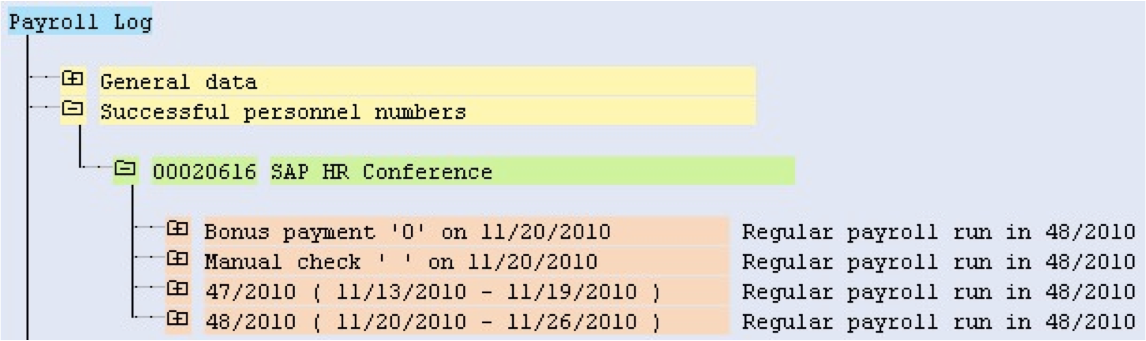
Here we can see a successful Payroll log. In this example, an employee processes through payroll without an error. By breaking down the Payroll log, we can see the employee processed through four period, three of which were retroactive.
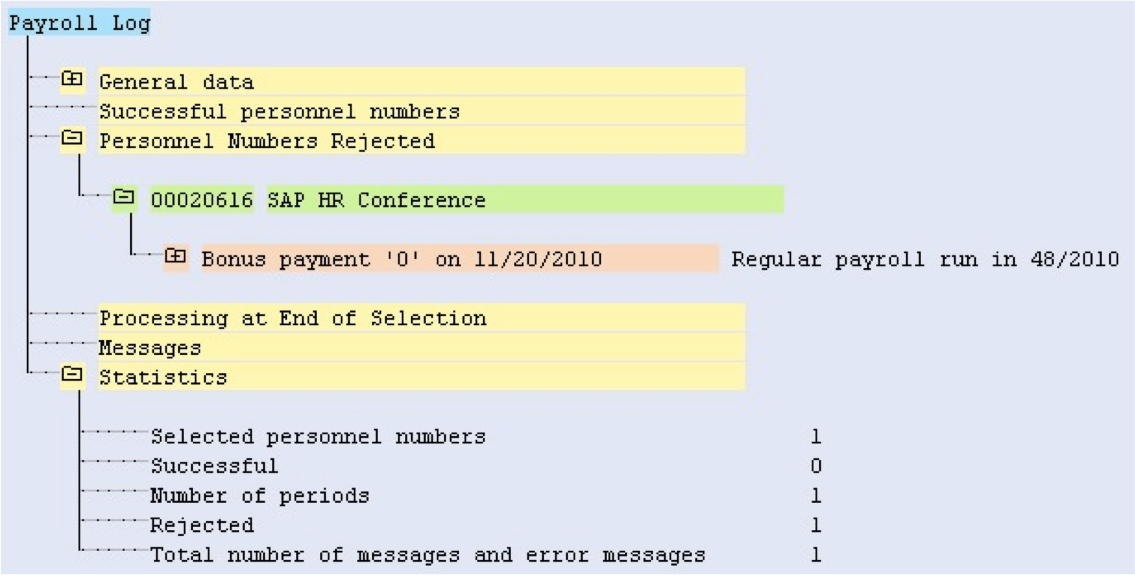
Now let’s throw in a twist. We set Infotype 0207 Residence Tax Authority to IN (Indiana), a state that has not been configured for this company. When we run payroll, this will result in an error for the employee.
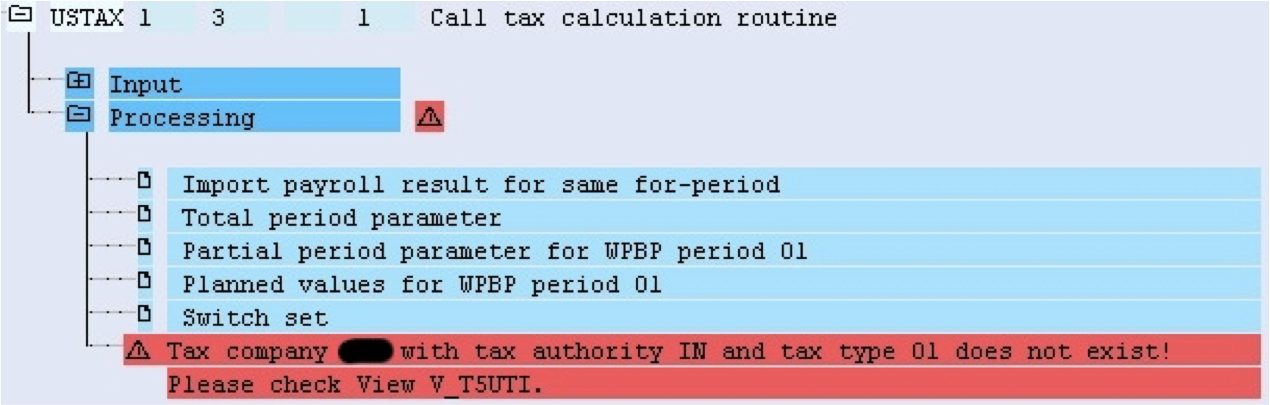
When an error like this is received, we need to review the employee paperwork to make sure the Residence Tax Authority should actually be IN. If IN was a typo, change Infotype 0207 to the correct tax authority and process payroll for the personnel number.
If the employee paperwork shows it should actually be IN, then we need to request an EIN for IN and setup the configuration to allow IN to process through payroll without an error. We will need to add the configuration to the appropriate tax company in table V_T5UTI keeping in mind that the error states only tax type 01, but there may be additional tax types to configure.
Implementing the use of proactive audits where possible will reduce the need for reactive error resolution. Here are a few examples of proactive audits that can be put in place:
Check that employees have cost centers
User exits to validate during time entry
Tax infotypes only contain tax authorities set up for the company
With some patience, willingness to learn, and due diligence, the troubleshooting process can be learned. Keeping in mind the different areas providing input and implementing proactive audits will greatly reduce how much troubleshooting needs to occur.
Please join us for our next blog post where we’ll discuss Year-end processing as another critical factor in SAP payroll.
Here at Integrated Consulting Group, we specialize in the design, development, and customization of SAP Human Capital Management business software for leading edge North American companies with global reach. Have any questions about SAP? Feel free to contact us via the contact page of our site, or on Twitter or LinkedIn.
Over the years, SAP has developed many payroll reports to make tax reporting and audit simpler process. However, these monthly, quarterly, and annual rituals can consume significant amounts of time and energy from payroll departments depending on the level of understanding of what SAP provides. Hopefully, you are already aware of the following reports you can use to audit your payrolls throughout the year.
Wage Type Reporter (tcode PC00_M99_CWTR)
Data is pulled from the RT and WPBP tables of payroll results selected
The report has several organizational structure object options to evaluate the results
Unfortunately, tax authority is not available for this report
Payroll Journal (tcode PC00_M10_CLJN)
Payroll results are pulled and displayed in this this easy to use report
Selection criteria are very limited and the underlying layout is configured
Changes to the layout require the transport process
Cost Center Report (tcode PC00_MNA_CC_ADM)
Managers of cost centers like this report’s availability
Detailed payroll charges can be seen and reconciled against FICO reports
Unfortunately, there are many HR objects not available for this report
Provides information about Infotype 0210 W-4 records that will expire
Tax Infotype Summary (tcode S_AHR_61016142)
Provides tax infotypes information that can be sent to employees for validation
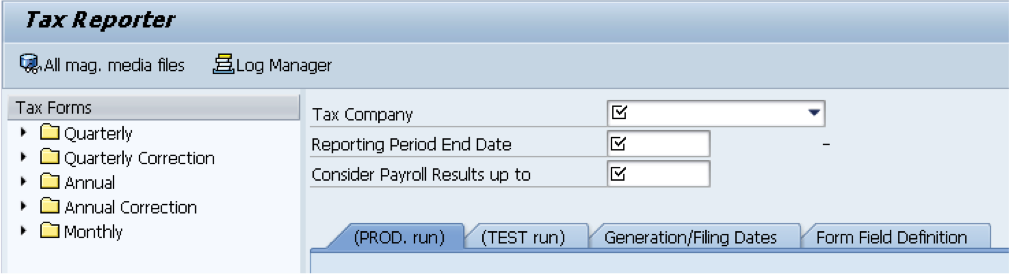
Tax Reporter (tcode PU19)
After validating employee master data and payroll results data, running the tax reporter to validate is the next step
If you are using a third-party for tax filing, this is a great way to validate against the data they have
Keep in mind you’ll need to configure Tax Reporter in addition to maintaining the third-party programs and tables
Review the Log Manager to see if any warnings or errors exist
Compare the output of data against the Payroll Reconciliation Report
Using the reports SAP has developed and provided should allow for complete and accurate tax reporting and auditing. Understanding what and how each report works and where it fits in the overall process is very important.
Please join us for our next blog post where we’ll discuss Troubleshooting as another critical factor in SAP payroll.
Here at Integrated Consulting Group, we specialize in the design, development, and customization of SAP Human Capital Management business software for leading edge North American companies with global reach. Have any questions about SAP? Feel free to contact us via the contact page of our site, or on Twitter or LinkedIn.
We have finished five of the 10 most critical factors of SAP payroll and will explore time management in this post. Time Management includes the collection of time-related data, absences and attendances, and may include evaluation of the raw data all within SAP. SAP delivers several Infotypes to collect data with the most common being:
2001 Absences
2002 Attendances
2006 Absence Quotas
2010 Employee Remuneration Info
2013 Quota Correction
0416 Time Quota Compensation
These infotypes may be maintained directly, through the use of Cross-Application Time Sheets (CATS), or interfaces from third-party time collection systems. SAP time evaluation is very powerful and flexible, but requires gaining a thorough understanding of business requirements and what SAP time evaluation can do. Time evaluation uses a variety of data elements for processing and generation of output including the aforementioned Infotypes, configuration tables, and schemas and rules that provide the instructions. Once time evaluation is implemented, it is fairly simple to perform.
Table configuration may be completed by following the steps in the IMG and keep in mind that not all nodes in the IMG are required if specific functionality will not be used, such as Incentive Wages.
Work schedules are required for all employees, even those with a fixed working time such as salaried employees. Through configuration working days, working hours, break time, etc. are all defaulted. Flexibility is provided by having groupings based on Personnel area/subarea combinations. In our example, all personnel subareas are set to the same PS grouping 10 since they have the same work schedule conditions.
Daily work schedules define the planned working time taking into account normal working hours and break schedules. Tolerances may be defined before and after the normal working schedule. In our example, we have defined five daily work schedules and we will look at SFT1 and SFT2 in more detail.
The two daily work schedules are nearly identical with the differences being with the Normal working start time and the Work break schedule.
Period work schedules are the sequence of daily work schedules for a specific number of weeks. Basically, the period work schedule combines daily work schedules into a structure. Period work schedule SFT1 is defined for a one week period and is in the red box. The daily work schedule SFT1 created in the previous step is set for Monday through Friday and daily work schedule FREE is set for Saturday and Sunday.
Period work schedule SFT6 is defined for a two week period. Week 1 has daily work schedule SFT5 set for Monday through Friday and daily work schedule FREE is set for Saturday and Sunday. Week 1 mirrors the Shift 1 period work schedule, except for the daily work schedule setting. Where things become different is SFT6 has week 2 where Monday is set to a daily work schedule of FREE and the rest of the week is as usual. What this tell us is that the employee associated with this period work schedule will alternate two and three day weekends.
Work schedule rules are grouped by Employee Subgroup Groupings, Holiday Calendar, Personnel Subgroup Grouping and defines the options available in Infotype 0007 Planned Working Time. Double-clicking on the record will take you to more details information about the work schedule rule.
During configuration use the dropdowns to select the ES grouping, Holiday Calendar ID, PS grouping, Period work schedule, and rule for day types. You’ll need to manually define the Working time section, which will default fields in Infotype 0007. Under the Work schedule generation section, the Start point in PWS is the week number. In our period work schedule examples we had SFT1 with only one week and SFT6 with two weeks. The Start point in PWS will be 001 when we are setting are using SFT1 as seen below, but could use 001 or 002 if we are using SFT6.
Time management has several Infotypes, configuration tables, and uses schemas and rules. All these together are powerful and can provide a great deal of flexibility. Knowing what options are available and using them to the potential has the ability to streamline the payroll process through efficiencies and lessen manual entry. Even if you don’t use SAP delivered time evaluation, the basic time management configuration is necessary for payroll to process.
Please join us for our next blog post where we’ll discuss Tax reporting and auditing as another critical factor in SAP payroll.
Here at Integrated Consulting Group, we specialize in the design, development, and customization of SAP Human Capital Management business software for leading edge North American companies with global reach. Have any questions about SAP? Feel free to contact us via the contact page of our site, or on Twitter or LinkedIn.
Testing is a building process where we look at individual functionality and see how it fits in the big picture. We can then identify how the process changes when moving from another system or by changes to the SAP system. How do are the differing levels of testing defined and what should levels should we go through?
Unit testing is the validation of individual functionality. Unit tests are typically performed by the technical or functional support team. Those team members should understand the business process.
If your support is outsourced, the outsourced team members should have an understanding of your specific business processes because general knowledge will not provide a specific enough understanding to your business processes and requirements. Many times, outsource team members are viewed as only technical or configuration, but their understanding will impact the effectiveness of functionality.
Integration testing is the validation of aggregate functionality by combining individual functionality. Integration testing is best performed by a mix of the support team and business users.
Parallel testing is the validation of data through concurrently testing functionality. Similar to integration testing a mix of support team and business team members is best.
Finally, we have User Acceptance testing where our Subject Matter Experts along with key users should review the functionality and validate that it will support the business processes and meet their requirements. The SMEs and business users should be able to perform all of the processes and identify breakdowns.
All stages of testing should be performed to provide a complete testing methodology. Unfortunately, when timelines are short it is not uncommon for testing to be shortchanged. The short-term gain may likely be outweighed when fallout is found in production and the result is incorrect employee remunerations. The best run projects will keep testing scopes intact and provide sufficient time and resources to verify business processes and requirements are met.
Please join us for our next blog post where we’ll discuss Time management as another critical factor in SAP payroll.
Here at Integrated Consulting Group, we specialize in the design, development, and customization of SAP Human Capital Management business software for leading edge North American companies with global reach. Have any questions about SAP? Feel free to contact us via the contact page of our site, or on Twitter or LinkedIn.
This is the fourth of 10 most critical factors of SAP payroll. We covered Data integrity, Integration, and Configuration and Customization in the first three and in this post we will cover Human Resources Support Packages and Country Legal Changes.
Human Resources Support Packages (HRSPs) were put in place by SAP many years ago to reduce the impact of updates towards year-end to HR and HR submodules. HRSPs are released approximately every month and contain individual SAP Notes and other legal and correction updates.
Country Legal Changes (CLCs) are similar to HRSPs, but contain a subset of the HRSP SAP Notes. SAP started creating CLCs in the last few years to provides for lesser disruption and risk to the SAP environment as a whole, HR and HR submodules, and payroll. CLCs are released periodically and contain individual SAP Notes and other legal and correction updates relevant to payroll for a specific country or countries. CLCs do require a specific synchronization HRSP so HRSPs are still required.
Synchronization HRSPs are typically released in May and November. You may apply the HRSP released in May and then the CLC for U.S. payroll released towards year-end and be able to complete year-end processing for the U.S. Many organizations now take this approach to limit testing towards year-end to U.S. payroll.
We are able to identify the minimum HRSP and CLC needed to be applied prior to year-end using the enhancement pack and HRSP currently in place and using SAP Service Marketplace.
Follow path Products > ERP > SAP ERP Human Capital Management > HR Support Packages > Schedule
HRSPs and CLCs are a fact of life and can be very difficult for support organizations and the business to accept. However, we need to make sure all parties impacted understand HRSPs and CLCs contain required legislative compliance updates along with bug fixes. HRSPs and CLCs are not an option, but a requirement for payroll to run successfully. The following items are examples of what are included.
Tax Reporter form layouts
401k or other benefit limits
New functionality required for the next year, such as employer paid benefits
Processes may change or underlying program logic changes
With all these changes, a thorough testing plan should be put in place that is repeatable. Repeatable allows us to slightly tweak the data from one testing project/year to the next.
Through our due diligence of what is included in the HRSPs and CLCs being applied, we need to define the impact and expectations for support and business areas outside of the HR module. The HRSPs may require Basis to apply a kernel update or our interface points may be impacted.
Developing a plan early in the year and monitoring the SAP Service Marketplace for release dates and side effects can make for a smooth process to keep payroll up-to-date by applying HRSPs and CLCs.
Please join us for our next blog post where we’ll discuss Unit and parallel testing as another critical factor in SAP payroll.
Here at Integrated Consulting Group, we specialize in the design, development, and customization of SAP Human Capital Management business software for leading edge North American companies with global reach. Have any questions about SAP? Feel free to contact us via the contact page of our site, or on Twitter or LinkedIn.
I believe there are four major areas of configuration and customization, all of which can be accomplished using standard SAP functionality.
SAP Project (transactioncodeSPRO)
Implementation Guide (IMG)
Schemas (tcode PE01)
Rules (tcode PE02)
Features (tcode PE03)
Beyond those major areas, we can get a better understanding of how things are working or enhance how payroll processes using tcode PE04 to review or customize Operations and Functions.
First let’s look at SAP Project using tcode SPRO and more specifically the Payroll: USA node.
Configuration of most payroll functionality may be completed by following the sequential steps in SPRO. Do keep in mind that not all nodes are required if specific functionality will not be utilized.
If your configuration is not currently documented or the documentation is outdated or in a poor state, you can easily follow the nodes to document configuration. This exercise is well worth the effort because it will undoubtedly bring up questions about why some items are configured they way they are. You may also identify pieces of configuration that are not setup causing you to miss out on useful functionality. Prior to beginning a new project to add functionality, understanding what is already configured will provide guidance. If functionality exists, but is not exactly what is needed, you can use that as a starting point.
Integration points we talked about in the previous post are found in tcode SPRO.
Accounting
Third-party remittance (Accounts Payable)
Benefits
Next we’ll cover Schemas in tcode PE01.
Schemas control the payroll processing steps and provide the instructions for the payroll program. They supply the logical flow of data in, calculation performance, and data out of the payroll program. The schema calls snippets of code within the payroll program for calculations, etc. at the appropriately defined time. Schemas call the snippets of code through functions and are highly customizable and flexible to meet business requirements. However, configuring has a feel of mixing table configuration and programming together that may be more difficult to catch onto as quickly. You must also keep in mind that schemas are not date delimited like most of the table configuration entries.
Next up are the Rules in tcode PE02.
Rules provide the logic flow of processing payroll and are attached to schemas and executed during payroll processing. Schemas trigger the use of a rule through assigning a function and rule. Rules contain operations that perform calculations or other decision logic, but configuration is not necessarily intuitive. Just like schemas, rules have the feel of mixing table config and programming together and are not date delimited.
Careful consideration should be taken when determining where to place a rule in a schema. Specific data may need to be pulled from employee master data or configuration tables or calculations performed prior to reaching the new schema.
The next major area of configuration is Features using tcode PE03.
Features (tcode PE03) are unique to SAP HCM and there are many that allow the defaulting of values in Infotypes or programs behind the scenes. Below are a some that every payroll expert should be aware of and understand
ABKRS – defaults the payroll area in Infotype 0001
ANSAL – wage type for annual salary
DTAKT – sender bank account number for DME
MODDE – default value for payment model
PPMOD – Symbolic account determination
TARIF – default pay scale type and area in Infotype 0008
ZLSCH – default setting for payment method
Last, but not least, we need to discuss the importance of documentation as part of configuration and customizing.
Documentation of the the configuration is crucial in the ongoing maintenance and support of the system. Documentation will help us remember and onboard new team members more quickly because we know why the original configuration was put in place. Documentation will also help us identify other issues or unintended consequences. Examples:
Payroll requests change to wage type posting attribute, but accounting hasn’t adjusted their audit process
Change to overtime calculation for 95% of employee base causes remaining 5% of employees to have incorrect overtime calculation
Change to cumulation settings of a wage type cause employee base not to have cumulation
Another area of documentation is the definition of service level agreements (SLA). The business and support working closely together to define the SLA is very important because it helps to prioritize and resolve issues in a timely manner. SLAs should be put in place whether the support is internal or outsourced to a third party.
Keep in mind, that SLAs should be defined both ways. User acceptance testing turnaround time should be known to assist in determining adequate resourcing for the business.
Summary
SAP provides a step-by-step method to configure most of the functionality required to run payroll. Customizing schemas, rules, and features we can enhance the configuration to meet nearly all business needs. Documentation of the configuration and customizations along with SLAs is critical to the success of ongoing maintenance and support.
Please join us for our next blog post where we’ll discuss HRSPs and LCPs as another critical factor in SAP payroll.
Here at Integrated Consulting Group, we specialize in the design, development, and customization of SAP Human Capital Management business software for leading edge North American companies with global reach. Have any questions about SAP? Feel free to contact us via the contact page of our site, or on Twitter or LinkedIn.
Integration occurs throughout the SAP payroll process by way of table configuration, schemas and rules, HR master data and configuration, employee time entry, Finance and Controlling master data, Accounts Payable configuration and master data, and interfaces to partners both before and after. There are many other integration points that directly impact the payroll process as well.
The level of integration that SAP provides between modules is astounding and allows for a holistic view. It’s awesome when it works! However, each module needs to understand new or changing functionality or master data that others are putting in place. For example:
Controlling changing the cost center structure can cause significant issues for payroll when it comes time to post.
Accounting opening and closing periods can cause issues depending on when payroll is processed and the posting date.
Accounts payable needs to create and maintain vendors for assignment of garnishments, benefits, taxes, and miscellaneous vendors.
The list could continue for quite some time.
To illustrate the integration, we’ll touch on a few.
Finance and Controlling
The Finance and Controlling modules have defined objects that are assigned to employees in Human Resources master data. These objects are then processed through to payroll and used during the Posting to Accounting process allowing actual expenses and liabilities to be allocated according to requirements.
Company code
Personnel areas are assigned to a company code.
Cost center
Organizational units or Positions may be assigned to a cost center.
Assignment performed at the individual employee level or even within a specific info type record.
Cost centers can be assigned at many different points during data collection and passed through payroll.
Infotype 0001 and 0027 for home and automatic distribution.
With wage types in Infotypes 00014, 0015, 2010.
Time entry in CATS or directly in Infotype 2001 and Infotype 2002.
Cost centers can also be overridden during payroll processing in schemas and rules.
Posting to accounting configuration may dictate a substitute cost center.
IMG > Payroll > Payroll: USA > Posting to Financial Accounting > Activities in the AC-System > Set up substitute cost centers
WBS element
Orders
Finance and Controlling have many objects that are used by payroll.
Accounts Payable
The process to send data from SAP Payroll to Accounts Payable is known as Third-party remittance. Third-party remittance allows a method for wage types generated during payroll to post to an Accounts Payable vendor account.
Garnishment processors
Tax authorities
Benefit providers
Other vendors
Once you post your third-party remittances, the proper AP vendors’ accounts are updated so that you can process them like any other liability through the AP payment program.
Vendors used for garnishments are selected directly in Infotype 0194
All other third-party remittance vendors go through a mapping process.
The mapping process requires the creation of an HR payee that is then tied to company code and AP vendor number. Keep in mind that since this is transportable configuration, the vendor number in production and development must be identical.
Proper review of how we’ll use third-party remittance and planning of the configuration is vital.
Time Management
Time Management is similar to payroll in that it is impacted by table configuration, time evaluation schemas and rules, employee master data, other SAP modules, and possibly external interfaces.
Time Management includes the collection of data in a raw or evaluated state.
SAP provides methods to capture data in a mostly raw manner through Infotypes and CATS (cross-application time sheets).
Using third-party data capture tools, data may be put in Infotypes or CATS in a mostly raw manner or put in a mostly evaluated manner in Infotype 2010.
The raw data is then processed through time evaluation to produce data ready for payroll processing.
The integration SAP has woven throughout their modules is wonderful when all the adjoining parts are working together. Proper planning, coordination, and communication is essential to the integration working harmoniously. That is why Integration is one of the 10 most critical factors of SAP Payroll.
Please join us for our next blog post where we’ll discuss how Configuration and Customization is another critical factor and how it relates to SAP payroll.
Here at Integrated Consulting Group, we specialize in the design, development, and customization of SAP Human Capital Management business software for leading edge North American companies with global reach. Have any questions about SAP? Feel free to contact us via the contact page of our site, or on Twitter or LinkedIn.
In last week’s blog post, we introduced our blog series about the 10 most critical factors of SAP payroll. This week, we will cover the first critical factor: Data Integrity.
Data integrity in payroll is a fundamental requirement due to the sensitive nature of what is being accomplished. Payroll is processed at a point in time with the expectation that incoming data is factual and complete.
The most straight forward and probably the best definition is from Thomas McRae in The Impact of Computers on Accounting, 1964. “Garbage in, garbage out.”
What are causes of poor data integrity?
Integration points
Configuration, customizations, system updates
Inadequate testing
Incomplete process knowledge or poorly implemented processes
When poor data integrity occurs, there are several possible outcomes:
Employees do not trust payroll and examine their remuneration statement
Employees do not receive their expected pay or no pay at all
Employees lose faith in the company and move on
Company loses money due to overpayments
Off-cycle adjustments are commonplace
Knowing the stakes are high and that employees don’t ever seem to forget that an error on their check occurred, what can be done to improve data integrity?
Develop metrics that will identify areas that cause the most errors. Do we have issues with:
Employee profile maintenance and time entry
Manager time approval
HR maintenance
System updates or outages
New or changing configuration and customization
Support personnel
Determine an acceptable rate of failure
100% accuracy is impractical, but how close can we get
The rate of failure should decrease over time
Improve processes
Develop a strong change management program so that new or updated functionality is fully understood by those impacted
Reminders through company email can be generated by looking at time entry on a daily or weekly basis and comparing against the employee schedule
The payroll process may require opening windows of time for HR to make updates
Effectively train new employees and continually train existing employees
Implement proactive audits
Simple to deploy, SAP delivered, before payroll, quick return
Verify employees are not missing a cost center using the Flexible Employee Data report: Tcode S_AHR_61016362
Check for locked employees prior to running payroll using report: Tcode PC00_M44_UCPL
Utilize the Wage Type Reporter variance from period to period functionality: Tcode S_PH9_46000172
Moderate to deploy, configuration required, before payroll when added to time evaluation or during payroll in its schema, quick return
Custom time and payroll rules to validate info type data: Tcode PE01 for schemas and PE02 for rules
Does Infotype 0001 have a cost center?
More difficult to deploy,ABAP, requires detailed analysis of all scenarios, before payroll, worth the effort if done right
CATS user exits: CATS0001-CATS0012
Infotype user exits and BAdIs: Enhancement PBAS0001 and BAdI HRPAD00INFTY
Please join us for our next blog post where we will discuss how Integration is another critical factor and how it relates to SAP payroll.
Here at Integrated Consulting Group, we specialize in the design, development, and customization of SAP Human Capital Management business software for leading edge North American companies with global reach. Have any questions about SAP? Feel free to contact us via the contact page of our site, or on Twitter or LinkedIn.