Month: November 2017

  • Using CATS Data: Updating PS (project systems)

    In our previous posts, we discussed Understanding the basics of CATS (cross-application time sheets) showing how SAP provides a very robust method to capture time data and have that data passed to other SAP modules. We then covered Using CATS Data: Updating CO (controlling) and Using CATS Data: Updating PM (plant maintenance).

    Next up is CATS updating the Project Systems module. Something to keep in mind is time entered in CATS as hours transfers to PS as minutes. This may initially throw you off and knowing it ahead of time is helpful. CATS generates confirmations for networks and performs activity allocation in CO at the same time. The PS confirmations contain state of processing, work center where the activity was carried out, and the individual person who carried out the activity.

    Just like PM orders, processing time can be a major issue if there is a large volume of open PS orders. Consider using nightly batch runs with narrow periods to reduce the processing time. However, narrowing the period to much may cause prior period corrections to be missed so performance vs. time period narrowing must be weighed carefully.

    An effective schedule we have put in practice is a nightly run pulling data for the last two weeks and a weekend run that pulls in data for a year. The weekend run will capture corrections that were made outside of our two week window we captured during nightly runs.

    Next we’ll discuss Using CATS Data: Updating HR (human resources).
  • Using CATS Data: Updating PM (plant maintenance)

    In our previous posts, we discussed Understanding the basics of CATS (cross-application time sheets) showing how SAP provides a very robust method to capture time data and have that data passed to other SAP modules. We then covered Using CATS Data: Updating CO (controlling) to see how controlling may use the CATS data. The next module we will discuss CATS updating is Plant Maintenance.

    CATS will generate confirmations for maintenance and service orders and will do this with Receiver orders, Operation number, and Sub-operations. The confirmations tell us the state of processing, work center where the activity was carried out, and the individual who carried out the activity. The generation of confirmations is simultaneous to activity allocation in CO.

    Keep in mind, that processing time can be a major issue if there is a large volume of open PM orders. Consider using nightly batch runs with narrow periods to reduce the processing time. However, narrowing the period to much may cause prior period corrections to be missed so performance vs. time period narrowing must be weighed carefully.

    An effective schedule we have put in practice is a nightly run pulling data for the last two weeks and a weekend run that pulls in data for a year. The weekend run will capture corrections that were made outside of our two week window we captured during nightly runs.

    Next we’ll discuss Using CATS Data: Updating PS (project systems).

  • Using CATS Data: Updating CO (controlling)

    In our previous post, we discussed Understanding the basics of CATS (cross-application time sheets). SAP provides a very robust method to capture time data and have that data passed to other SAP modules.

    The first module we will discuss CATS updating is Controlling. CATS updates CO with hours actually worked by cost center for an employee. Even in the most basic implementation of CATS, controlling typically receives data.

    The payroll expense posting for an employee is sent to the employee home cost center in the payroll process Posting to Accounting. Further down is an example where the payroll expense posting for an employee is sent to the employee’s home cost center. Regardless of the cost center overrides in CATS, the cost center found in Infotype 0001 (Organizational Data) is the primary default.

    CATS functionality allows for activity allocation between the cost centers. Using CATS, you can create an activity allocation to credit the home cost center for hours not worked by the employee and debit the cost centers where the employee actually worked.

    The hours entered in CATS flow to Controlling based on the cost center where work was performed. CATS allows the employee home cost center to be posted, or during time entry an override cost center may be entered. This moves time data between the worked cost centers and the employee home cost center.

    Actual costs may be determined from the standard activity price associated to an activity type or from the payroll process.

    Example:

    Master data

    • Employee John works 80 hours over a two-week pay period
    • John is an hourly employee who makes $15/hour and is assigned to cost center 123-A as his home cost center
    • John’s company uses CATS as a time entry/capture tool

    Work data

    • Over the two-week period, John worked 40 hours in cost center 345-B, 30 hours in cost center 678-A, and 10 hours in his home cost center, cost center 123-A
    • His gross pay for the period is 80 hours x $15/hour = $1,200

    Payroll Posting to Accounting

    • John’s home cost center, 123-A, is debited $1,200 (the entire 80 hours that he worked)

    From home cost center 123-A

    • The CATS interface will credit John’s home cost center (123-A) 70 hours (multiplied by a predefined activity rate, $15/hour), for a total of $1,050 – via an internal activity allocation. This will leave a net debit of $150 (10 hours x $15/hour) on John’s home center

    To cost centers 345-B and 678-A

    • The other side of the CATS interface activity allocation will debit cost center (345-B) 40 hours, for a total of $600, and cost center (678-A) 30 hours, for a total of $450

    Next we’ll discuss Using CATS Data: Updating PM (plant maintenance).

  • Understanding the basics of CATS (cross-application time sheets)

    SAP provides very useful and robust functionality to capture employee time in Cross-Application Time Sheets (CATS). CATS is a mechanism to capture employee time and post to cost centers, projects, networks, or other cost objects. Some important points when considering CATS:

    • Uses the SAP Human Resources authorization concept
    • May be updated through the SAP GUI via transaction code CAT2, company web portal, or Fiori
    • Data entry in CATS may be done by an individual employee, interface uploads, or by an administrator for multiple employees
    • CATS may be used as the time transfer tool to update Human Resources with hours worked by employee
    • Many overrides may be entered in CATS such as tax work area, special payments, substitutions, pay rate differences
    • Data entered in CATS may be set to require a approval before further processing may occur

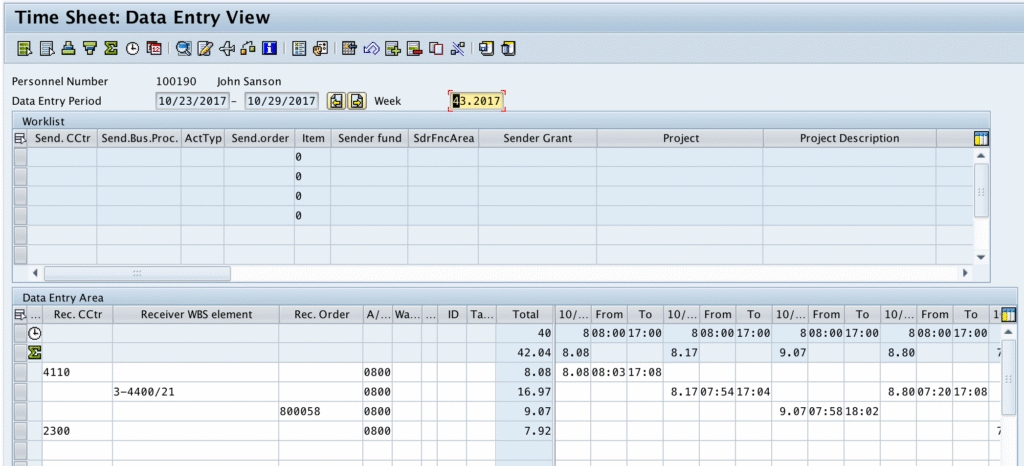
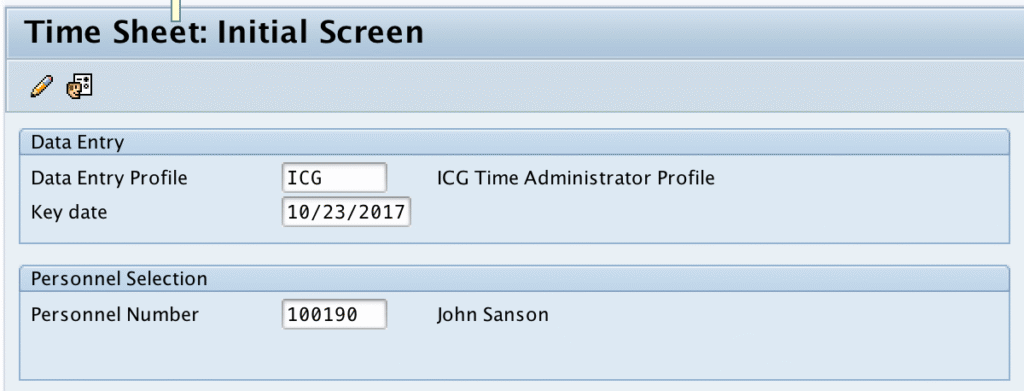
    Below is a screenshot of the SAP GUI transaction code CAT2. The data entry profile entered defines how the time sheet looks. You have the ability to default in the data entry profile by setting the user parameter CVR. This specific profile allows the user to enter time for one employee at a time so we enter the personnel number we want to record. We also enter the Key date to determine the time period we will be entering the time data.

    In the time entry screen, we enter the cost objects, absence or attendance type, and hours for the given day. This screen is highly customizable to meet your needs in what data is displayed and allows for entry. Beyond the entry screen, CATS user exits may be employed to perform validations and defaulting of fields.

    Once the time data is captured, subsequent programs may be run to update other modules such as Human Resources, Controlling, Plant Maintenance, Project Systems. CATS can updated multiple modules or individual modules allowing flexibility.

    • HR may want the data passed on a nightly basis or even immediately
    • CO may want the data passed weekly

    In our next blog post, we’ll discuss Using CATS Data: Updating CO (controlling).