
Month: April 2015

  • 10 most critical factors of SAP payroll: Tax reporting and auditing

    Tax reporting and auditingWe have covered 6 of the 10 most critical factors of SAP payroll in this blog post series. The next area we’ll cover is Tax reporting and auditing.

    Over the years, SAP has developed many payroll reports to make tax reporting and audit simpler process. However, these monthly, quarterly, and annual rituals can consume significant amounts of time and energy from payroll departments depending on the level of understanding of what SAP provides. Hopefully, you are already aware of the following reports you can use to audit your payrolls throughout the year.

    Wage Type Reporter (tcode PC00_M99_CWTR)

    • Data is pulled from the RT and WPBP tables of payroll results selected
    • The report has several organizational structure object options to evaluate the results
    • Unfortunately, tax authority is not available for this report

    Payroll Journal (tcode PC00_M10_CLJN)

    • Payroll results are pulled and displayed in this this easy to use report
    • Selection criteria are very limited and the underlying layout is configured
    • Changes to the layout require the transport process

    Cost Center Report (tcode PC00_MNA_CC_ADM)

    • Managers of cost centers like this report’s availability
    • Detailed payroll charges can be seen and reconciled against FICO reports
    • Unfortunately, there are many HR objects not available for this report

    Payroll Reconciliation Report (tcode PC00_M10_REC)

    • There is a great deal of flexibility in this report, but that flexibility can be confusing
    • Validation of both Tax Reporter and amounts posted to FI are great applications of this report
    • Wage types can be configured as part of a Wage Type Application, which will combine the wage types in display
    • Retro activity in payroll can be easily displayed and tweaked for more informative output
    • The report can be run for specific types of payrolls making for easy identification of Voided checks or specific types of Off-Cycles during a period

    reconciliation report

    • Finally, individuals can create and save the ALV layout of their liking

    Flexible Employee Data Report (tcode S_AHR_61016362)

    • You’ll see this report often used for Birthday lists
    • However, it can provide a great deal of information about the employee population and make year-end validation easier
    • Flexible means you get to pick up to 20 fields to display in the output

    flexible employee data report

    Withholding Allowances Report (tcode S_PH9_46000361)

    • Provides a reconciliation between what an employee has claimed for exemptions in Infotype 0210 W-4 and what is allowed for a tax authority

    Exemption Expiration Report (tcode S_PH9_46000360)

    • Provides information about Infotype 0210 W-4 records that will expire

    Tax Infotype Summary (tcode S_AHR_61016142)

    • Provides tax infotypes information that can be sent to employees for validation

    Tax Reporter (tcode PU19)

    • After validating employee master data and payroll results data, running the tax reporter to validate is the next step
    • If you are using a third-party for tax filing, this is a great way to validate against the data they have
    • Keep in mind you’ll need to configure Tax Reporter in addition to maintaining the third-party programs and tables
    • Review the Log Manager to see if any warnings or errors exist
    • Compare the output of data against the Payroll Reconciliation Report
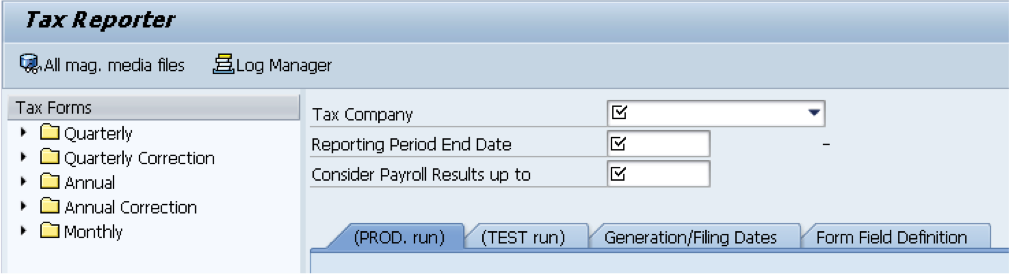
    pu19

    Using the reports SAP has developed and provided should allow for complete and accurate tax reporting and auditing. Understanding what and how each report works and where it fits in the overall process is very important.

    Please join us for our next blog post where we’ll discuss Troubleshooting as another critical factor in SAP payroll.

    Here at Integrated Consulting Group, we specialize in the design, development, and customization of SAP Human Capital Management business software for leading edge North American companies with global reach. Have any questions about SAP? Feel free to contact us via the contact page of our site, or on Twitter or LinkedIn.

  • 10 most critical factors of SAP payroll: Time management

    We have finished five of the 10 most critical factors of SAP payroll and will explore time management in this post. Time Management includes the collection of time-related data, absences and attendances, and may include evaluation of the raw data all within SAP. SAP delivers several Infotypes to collect data with the most common being:

    • 2001 Absences
    • 2002 Attendances
    • 2006 Absence Quotas
    • 2010 Employee Remuneration Info
    • 2013 Quota Correction
    • 0416 Time Quota Compensation

    These infotypes may be maintained directly, through the use of Cross-Application Time Sheets (CATS), or interfaces from third-party time collection systems. SAP time evaluation is very powerful and flexible, but requires gaining a thorough understanding of business requirements and what SAP time evaluation can do. Time evaluation uses a variety of data elements for processing and generation of output including the aforementioned Infotypes, configuration tables, and schemas and rules that provide the instructions. Once time evaluation is implemented, it is fairly simple to perform.

    Table configuration may be completed by following the steps in the IMG and keep in mind that not all nodes in the IMG are required if specific functionality will not be used, such as Incentive Wages.
    time management configuration

    Work schedules are required for all employees, even those with a fixed working time such as salaried employees. Through configuration working days, working hours, break time, etc. are all defaulted. Flexibility is provided by having groupings based on Personnel area/subarea combinations. In our example, all personnel subareas are set to the same PS grouping 10 since they have the same work schedule conditions.
    work schedules

    Daily work schedules define the planned working time taking into account normal working hours and break schedules. Tolerances may be defined before and after the normal working schedule. In our example, we have defined five daily work schedules and we will look at SFT1 and SFT2 in more detail.
    daily work schedule

    The two daily work schedules are nearly identical with the differences being with the Normal working start time and the Work break schedule.
    daily work schedule

    Period work schedules are the sequence of daily work schedules for a specific number of weeks. Basically, the period work schedule combines daily work schedules into a structure. Period work schedule SFT1 is defined for a one week period and is in the red box. The daily work schedule SFT1 created in the previous step is set for Monday through Friday and daily work schedule FREE is set for Saturday and Sunday.

    Period work schedule SFT6 is defined for a two week period. Week 1 has daily work schedule SFT5 set for Monday through Friday and daily work schedule FREE is set for Saturday and Sunday. Week 1 mirrors the Shift 1 period work schedule, except for the daily work schedule setting. Where things become different is SFT6 has week 2 where Monday is set to a daily work schedule of FREE and the rest of the week is as usual. What this tell us is that the employee associated with this period work schedule will alternate two and three day weekends.
    period work schedule

    Work schedule rules are grouped by Employee Subgroup Groupings, Holiday Calendar, Personnel Subgroup Grouping and defines the options available in Infotype 0007 Planned Working Time. Double-clicking on the record will take you to more details information about the work schedule rule.
    work schedule rule

    During configuration use the dropdowns to select the ES grouping, Holiday Calendar ID, PS grouping, Period work schedule, and rule for day types. You’ll need to manually define the Working time section, which will default fields in Infotype 0007. Under the Work schedule generation section, the Start point in PWS is the week number. In our period work schedule examples we had SFT1 with only one week and SFT6 with two weeks. The Start point in PWS will be 001 when we are setting are using SFT1 as seen below, but could use 001 or 002 if we are using SFT6.
    work schedule rule detail

    Time management has several Infotypes, configuration tables, and uses schemas and rules. All these together are powerful and can provide a great deal of flexibility. Knowing what options are available and using them to the potential has the ability to streamline the payroll process through efficiencies and lessen manual entry. Even if you don’t use SAP delivered time evaluation, the basic time management configuration is necessary for payroll to process.

    Please join us for our next blog post where we’ll discuss Tax reporting and auditing as another critical factor in SAP payroll.

    Here at Integrated Consulting Group, we specialize in the design, development, and customization of SAP Human Capital Management business software for leading edge North American companies with global reach. Have any questions about SAP? Feel free to contact us via the contact page of our site, or on Twitter or LinkedIn.